Clear Signing vs Blind Signing: How Wallet Warnings Prevent Losses
 Karim Daniels

You only need one rushed click to lose a wallet. That’s the uncomfortable truth behind most “how did my funds disappear?” stories. The fix isn’t magic — it’s better prompts, and actually reading them. That’s where clear signing comes in, and why blind signing keeps biting people.
This isn’t theoretical. Hardware vendors, wallets, and dApps have spent the last year pushing standards that turn raw calldata into plain language on your device screen. The idea is simple: show me what I’m really agreeing to before my key signs anything.
Let’s break down clear signing vs blind signing, what good warnings look like, and the quick changes that make drainers a lot less likely to work on you.
| Point | Details |
|---|---|
| Clear signing | Converts raw calldata into human-readable intent on the device screen so you can verify what you’re authorizing before you sign. |
| Blind signing | Signs opaque data with limited or no context. Faster, but you can’t confirm whether you’re approving an unlimited spend or interacting with the wrong contract. |
| Wallet warnings | Good wallets flag blind-signed actions and high-risk approvals, forcing explicit acknowledgement rather than a quick click-through. |
| Standards | ERC-7730 enables full on-device display when both the wallet and the dApp support it. Vendor kits help wallets integrate the flow. |
| Practical defense | Disable blind signing, clean token approvals, use transaction simulation, and favor dApps that support clear signing. |
What clear signing actually shows you
Clear signing is about intent. Instead of displaying a hash soup, your device renders fields you can understand: which contract, which method, what asset, how much, and to whom. You verify, then sign.
Ledger’s updated docs from July 2026 lay it out cleanly: their Clear Signing converts raw calldata into human-readable intent on the signer’s secure screen. If the device can’t interpret it, a standard blind-signing warning must be shown and the user has to explicitly acknowledge it (Ledger Developer Portal).
When clear signing works end to end, you might see prompts like these:
- Swap: “Swap 1.05 WETH for minimum 3412 USDC via
0xABC…. Max slippage 0.5%.” - Approval: “Approve USDC spending by
0xDEX…. Limit: 500 USDC.” - NFT listing: “List NFT #1234 from collection
CoolCatsfor 1.2 ETH on marketplace0xMKT….”
Is every device and dApp this clear? Not yet. But that’s the direction, and it’s a huge step up from “sign this message” with no context.
Why people still blind-sign (and why it bites)
Blind signing sticks around for three reasons: speed, compatibility, and habit. Some dApps still trigger flows that aren’t fully supported on-device. Some users click through because that’s what they’ve always done. And sometimes you’re in a mint, or a game, and the screen says “blind sign to continue.”
The issue is obvious: if you can’t see what you’re agreeing to, you can’t judge the risk. Coin Bureau’s July 2026 update lists malicious transaction signing and blind signing among the top hardware-wallet threats — and puts clear signing and on-device verification at the top of the defenses list (Coin Bureau (Top Hardware Wallet Security Threats)).
Real-world drainers love this. They’ll bury a setApprovalForAll or a max approval behind a harmless-looking button. Blind signing turns “huh, what am I approving?” into “oops, too late.”
Wallet warnings: what they prevent, what they don’t
Good wallets try to catch you before you fall. A proper blind-signing flow should flash a large, unmissable warning on the device, then require explicit acknowledgement — not just a soft nudge. Ledger’s guidance requires exactly that when the data can’t be rendered (Ledger Developer Portal).
These warnings do real work. They interrupt autopilot. They remind you this action won’t be fully described, and you should back out unless you trust every part of the path.
But warnings can’t save you if you click straight through them. And they still rely on correct metadata from wallets and dApps. If a site lies about what it’s doing, or the wallet can’t parse the call, you’re back to judgment calls and hygiene: separate wallets, small test transactions, and transaction simulation.
Pro tip: if any prompt says “unlimited” or “setApprovalForAll,” stop. Switch the approval to a small amount or skip the action entirely unless you genuinely need it.
Standards and support: ERC-7730 and vendor kits
Clear signing isn’t magic; it’s standards plus tooling. On Ethereum and EVM chains, ERC-7730 has become the reference for showing full intents on-device. The catch: it only works fully when both the wallet and the dApp support it.
Ledger published implementation details for wallets in July 2026. Their “For Wallets” guidance explains that providers can wire up Clear Signing with the Device Management Kit (DMK) and Device Signer Kit (DSK), and reiterates that full on-device display needs ERC-7730 support on both sides (Ledger Developer Portal — For Wallets).
For users, this translates to a simple rule of thumb: prefer wallets and dApps that support ERC-7730, and update firmware and app versions often. Capability jumps with each release.
Hardening your setup in 15 minutes
You don’t need to rebuild your workflow. Make a few changes and most drainer kits stop being “one-click” catastrophes.
- Turn off blind signing. If your device or wallet lets you disable blind signing by default, do it. DEXTools’ July 2026 tutorial specifically advises disabling blind signing in hardware settings to avoid drainers (DEXTools News).
- Update everything. Device firmware, wallet apps, browser extensions. Clear signing support improves with each release; outdated software often falls back to blind signing.
- Clean up approvals. Revoke open token approvals you don’t need. DEXTools also highlights this: tidy your allowances and avoid unlimited approvals whenever possible (DEXTools News).
- Use transaction simulation. A reputable simulator will show you net effects: what leaves, what arrives, and which contract touches your assets. If the sim can’t parse it, that’s a yellow flag.
- Split wallets by risk. Keep a clean cold wallet for storage, a limited-funds hot wallet for experiments, and a separate trading wallet for centralized venues.
- Check the contract, not just the URL. Paste the contract address into a block explorer, read recent interactions, and verify it matches the project’s official channels.
- Favor ERC-7730-aware dApps. If your screen shows clear, specific fields, that’s good. If it defaults to a blind-sign warning, consider walking away unless you’re absolutely sure.
Pro tip: for recurring actions like DEX approvals, set a spend limit close to what you need today. You can raise it later. Unlimited approvals are a drainer’s best friend.
Reading prompts: practice with common actions
Even with clear signing, you still need to read. Here’s what to look for in everyday flows:
Token approval
- Asset and decimals: Is it the token you expect? Watch for fake lookalikes with similar tickers.
- Spender: Which address are you giving permission to? Does it match the dApp’s published contract?
- Limit: Unlimited or a number. If it’s unlimited, ask yourself why.
Swap
- From/To: The exact tokens and amounts. Confirm minimum received or slippage guard.
- Router/Contract: Is this the expected aggregator or DEX?
- Fees: Any protocol fee or relayer hint? If fees look off, pause.
NFT actions
- Collection and token ID: Verify you’re handling the right NFT.
- Action: Listing, cancel, transfer? It should be explicit.
- Marketplace contract: Matches the platform? If not, back up.
Bridging and staking
- Destination chain or validator: Make sure it’s the intended target.
- Lock vs transfer: Understand whether funds are wrapped, escrowed, or moved.
- Unstake timing: Any lock period should be visible somewhere in the flow.
When the device can’t render a detail, don’t guess. That’s where warnings matter: a blind-sign prompt is a signal to stop and verify through other channels before proceeding.
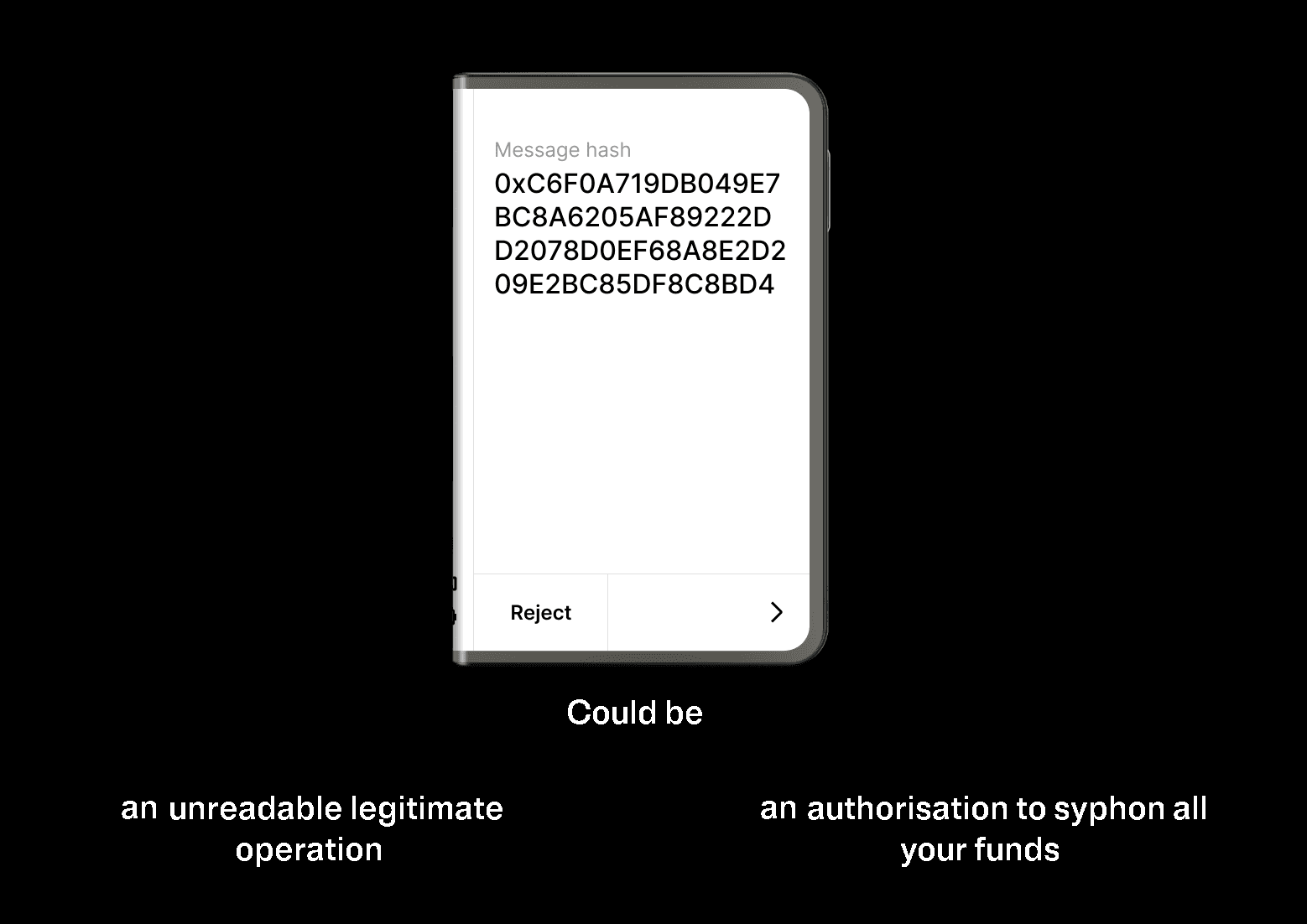
Ledger graphic contrasting an unreadable message-hash screen (blind signing) with clear, human-readable transaction fields on a device — visually shows why clear signing lets users verify intent before approving. — Source: Ledger Developer Portal
How drainers exploit blind signing
Most wallet drainers aren’t sophisticated, they’re opportunistic. Here are the patterns that show up over and over:
- Approval traps: A “claim” button that hides a token approval with unlimited allowance. Clear signing would show “Approve unlimited,” but blind signing won’t.
- SetApprovalForAll on NFTs: You think you’re listing; they’re asking for full control of your collection.
- Phishing through walletconnect-style links: You scan a QR on social media; the site requests signatures that hand over control.
- Message-to-transaction pivots: An innocuous typed message is followed by a transaction that looks similar but isn’t. Fatigue does the rest.
- Contract spoofing: The UI says “Official Router,” but the on-device contract address doesn’t match. Clear signing helps spot this mismatch.
Coin Bureau’s guidance to verify on-device details lines up with this reality: drainers don’t need to break your crypto if they can just talk you into authorizing it (Coin Bureau (Top Hardware Wallet Security Threats)).
For builders: safer UX without slowing users
If you ship a wallet or a dApp, you can reduce blind signing without trashing your conversion funnel.
- Adopt ERC-7730 end to end: Support intent-rich payloads so devices can render full prompts.
- Integrate vendor kits: Wallet teams can use Ledger’s DMK and DSK to implement Clear Signing and device flows correctly (Ledger Developer Portal — For Wallets).
- Chunk risky actions: Separate approvals from swaps, default to limited allowances, and explain why each step exists.
- Inline simulation: Show net effects and warn when data can’t be decoded. If the device will blind-sign, say so upfront.
- Make the right choice easy: Prominent “Limit approval” buttons, clear labels, and a dedicated “Review on device” step help users slow down when it matters.
Pro tip: rewrite warnings like a human. “This request can’t be fully verified on your device. If you didn’t intend to grant spending permission, cancel now.” That copy saves wallets.
If you want a steady beat on wallet safety, standards, and the tradeoffs that really matter, we cover it regularly at Crypto Daily. No fluff, just what helps you keep your keys — and your coins.
Frequently Asked Questions
What’s the single biggest benefit of clear signing?
You can see what you’re authorizing on the device itself. That kills a lot of drainer tricks because you’ll notice if the contract, asset, or amount isn’t what you intended.
Do I ever need blind signing?
Sometimes you’ll hit older dApps or niche flows that don’t support on-device rendering. If you must proceed, double-check contract addresses, simulate the transaction, and keep amounts small.
How do I know if a dApp supports ERC-7730?
If your device shows a detailed, clean prompt with method names, assets, and amounts, that’s a good sign. Some projects also document support in their docs or release notes.
Will wallet warnings stop all scams?
No. Warnings reduce mistakes; they don’t fix bad judgment or phishing. If a prompt is unclear, don’t sign it. Verify the action through official links and contract addresses.
What should I change today to reduce risk?
Disable blind signing where possible, revoke stale token approvals, update firmware and wallet apps, and favor dApps that support clear signing and simulation.
Are hardware wallets still worth it if blind signing exists?
Yes. Hardware wallets protect your keys and, when paired with clear signing, massively improve safety. The key is using on-device verification and not clicking through warnings.
Does clear signing slow transactions down?
A bit. You’ll spend a few more seconds reading prompts. That tradeoff is worth it compared to the time and money lost to one bad blind signature.
Disclaimer: This article is provided for informational purposes only. It is not offered or intended to be used as legal, tax, investment, financial, or other advice.
Related Stories